Kristina Schulz

Updated 6 months ago

Record screen for free

Icecream Screen Recorder is a screen capture program developed by Icecream Apps Ltd to empower your screenshots. It is a beneficial addition to your Windows utilities as it allows you to record various multimedia activities such as apps and games, video tutorials, webinars, live streams, Skype calls, and more.

Here, you can opt to capture your whole screen or just a part of it along with its audio and webcam. This service offers a free edition however, it is limited in features and functions which somehow forces you to upgrade it to PRO. 

Feature-packed screen recordings

Icecream Screen Recorder provides you with the option to take an image of a portion of a page or the entire window. Besides such a standard screen capture feature, the real benefit in regards to this option is that you can also record live webinars and streaming videos. Whether referring to Vimeo, Dailymotion, or YouTube, it can accurately capture videos of various formats with the click of a button.

With its powerful PC screen recorder, you will be able to capture full-screen 3D games as well. If there's a certain part that you want to highlight, you can do so through the annotation feature. Using this allows you to add text, arrows, and shapes in your recorded video or screenshot. Furthermore, it serves some necessary editing tools that enable you to trim recordings or change speed.

How do you use Icecream Screen Recorder?

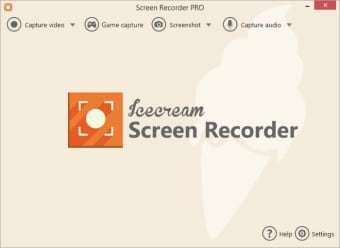
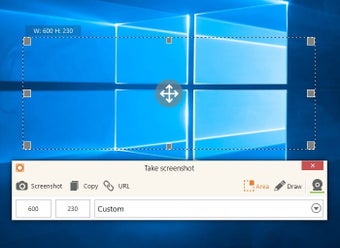
When you launch this utility tool, you immediately notice its two main functions: Capture video and Screenshot. Unlike the traditional screen capture method through the ‘Print Screen’ button on your keyboard, Icecream Screen Recorder provides a more comprehensive approach. It allows you to choose any screenshot area, which is hardly found in the standard way of screen grabbing. Actually, this feature can also be enjoyed when screen recording.

Prior to saving it, you can even customize it to your preference. Using the editing tools it offers, you can mark out, underline, and frame certain parts of your screenshot. While you are recording, on the other hand, you will be able to draw or type on the screen in real-time as well. Your screenshots will be saved as either PNG or JPG images. Meanwhile, your recordings can be easily uploaded to YouTube, Dropbox, and Google Drive

An ingenious screen capture tool

If you intend to capture an image or record screen in order to highlight specific areas, Icecream Screen Recorder is an innovative program. You are allowed to add annotations such as circles, lines, boxes, and arrows. All screenshots are able to be saved directly onto your hard drive and within a destination of your choice. This is a great alternative for the very basic ‘Print Screen’ function.


Kristina Schulz

    Kristina has professional experience in Europe, the United States, and Asia, specializing in communication and languages. She values adaptability in multicultural settings and brings this perspective to her writing. Her content reflects clarity, cross-cultural awareness, and practical expertise in connecting ideas through language.

    • Pros

      • Supports multiple file formats
      • Record and save standard images
      • Draw or add text in real-time to screen recordings
      • Record fast-paced 3D games
    • Cons

      • Extremely limited offerings in free edition plan
      • Supports few video codecs
     0/7

    App specs

    Also available in other platforms

    Program available in other languages


    Icon of program: Icecream Screen Recorder

    Icecream Screen Recorder for PC

    • Trial version
    • 3.7
      800
    • 313.3K
    • V7.44

    User reviews about Icecream Screen Recorder

    3.7

    10 reviews

    Add review

    Main reviews for you

    • Anonymous user

      Creenrecorder enables you to capture video and take screenshots of the whole screen or a specific area. A lot of broadcastingcy allow to watch their broadcasts you've missed for a set amount of time. If you want to record that broadcast for own use that is no piracy, retransmitting, or distributing. This screenrecorder doesn't allow that and gives then a black screen. Icecream doesn't want to refund their unusable software and accuses you of piracy.

    • Anonymous user

      I was a loyal user of Icecream screen recorder but it caused some lagging issues which became even worse and the audio sync was the trouble which took my nerves. Then, I started using ScreenRec which never caused this issue again. With ScreenRec, I could record unlimited videos. OBS is also a good free screen recording solution.

    • Anonymous user

      I recommend it. It is Amazing! I am using it and I must say, everything people must use it.

    • Anonymous user

      Yes, I haven't used it yet but I recommend it.Yes, I haven't used it yet but I recommend it.

    • Anonymous user

      Work very well in my experience. Can record partial screen. I will definitely recommend this

    • Anonymous user

      Very VERY bad!. Its very bad! I could even use it!! It made me upset! Please check out my channel ull see why (chanello_playzz)!!!

    More

    You may also like

    Alternatives to Icecream Screen Recorder

    Explore Apps

    Latest articles

    Laws concerning the use of this software vary from country to country. We do not encourage or condone the use of this program if it is in violation of these laws.
    Softonic

    Is Icecream Screen Recorder safe?

    100/100

    Score result: Clean

    This file passed a comprehensive security scan using VirusTotal technology. It is safe to download.

    • Virus free
    • Spyware free
    • Malware free
    • Verified by Security Partners

      VirusTotal logo

    Scan Info

    Last scan
    Thursday, November 6, 2025
    Scan provider
    VirusTotal · Full report

    File Integrity

    File
    Icecream_Screen_Recorder_V7.44.exe
    SHA256
    ef3aa992eb97adc1868272c1f908a2a1d06b60532d99967119fa799f2a54e24c
    SHA1
    35503cafaa1593d51c24b76c4fe5f2cebaddb4ed

    Softonic security commitment

    Icecream Screen Recorder has been thoroughly scanned by our advanced security systems and verified by industry-leading partners. This file comes from the official developer and has passed all our security checks, showing no signs of viruses, malware, or spyware. For more information, visit our Security and Trust Center